Technical Support | Documents & Downloads

.

DoorKing 1610 traffic control warning sign with green 5 MPH speed limit notice, pedestrian and bicycle restriction, and integrated traffic light

1610 Warning Signs & Traffic Signal

Below you will find a variety of documents to address installation and troubleshooting questions, software availability, video tutorials, and more.

For additional questions, please scroll to the bottom of the page to select a method of contact, or locate an installer.

Looking for help with a different product? Start by choosing the product category below:

Tech Support Downloads

SOFTWARE
NO SOFTWARE OR APPS AVAILABLE - If there are no software or apps available for your device, it means that the system is likely a standalone device that operates independently and does not require any additional software or applications to function.
SOFTWARE MANUALS
This product does not currently have any Software Manuals
QUICK START GUIDES
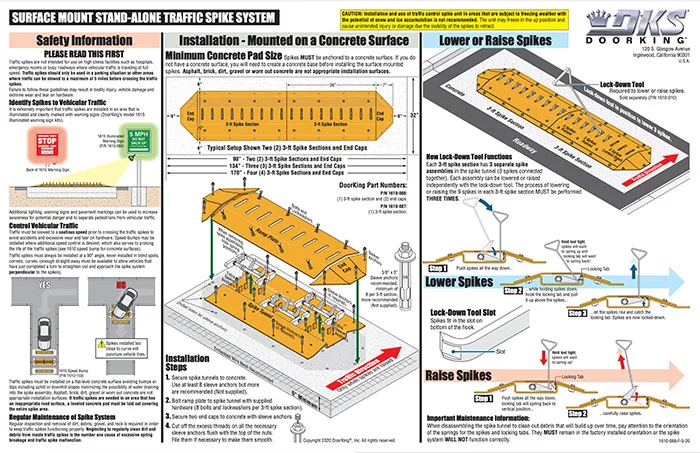
DKS Doorking 1610-066-F-5-20 Spikes Surface Quickstart
1610 Spikes Surface Mount | Quick Start
1610 Surface Mount Spike System

1610-066-F-5-20
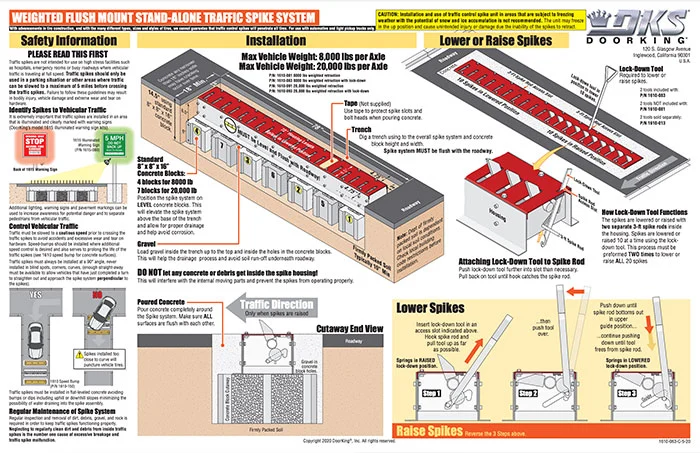
DKS Doorking 1610-063-D-11-22 Spikes Weighted Quickstart
1610 Spikes Flush Mount Weighted Retraction | Quick Start
1610 Flush Mount Weighted Spike System Quickstart

1610-063-D-11-22

DKS Doorking 11610-062-E-11-22 Spikes Spring Quickstart
1610 Spikes Flush Mount Spring Retraction | Quick Start
1610 Flush Mount Spring-loaded Spike System Quickstart

1610-062-E-11-22

OWNER'S MANUALS
This product does not currently have any Owner's Manual
How to Manuals
This product does not currently have any How to Guidelines
ACCESSORIES MANUALS
DKS Doorking 1603-264-G-10-21 Traffic Signal 12VDC
LED Traffic Light And Mounting Kit 1603-221 / 1603-222 / 1603-223 | Accessory Manual

1603-264-K-4-26

DKS Doorking 1603-265-C-8-16 Traffic Signal 115VAC
Traffic Light and Mounting Kit Installation (Discontinued) | Accessory Manual

1603-265-C-8-16
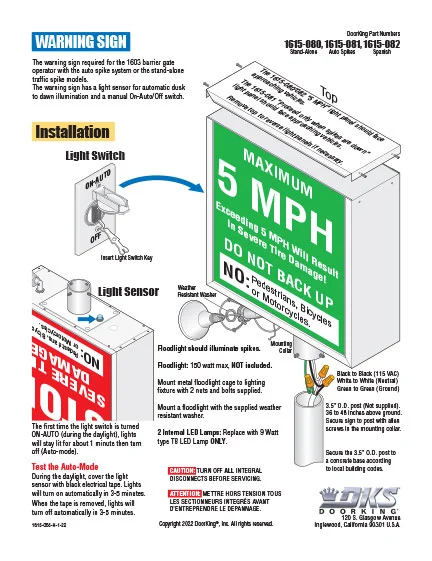
DKS Doorking 1615-065-H-1-22 Warn Sign
Warning Sign Installation | Accessory Manual

1615-065-H-1-22

SOFTWARE VIDEOS
This product does not currently have any Software Videos

Architects | Specifiers Downloads

Literature
DKS Doorking Warning Signs - 5 MPH - Wrong Way - Warning & Traffic Lights Literature
1610 Sign / Light | Literature

Rev 2-22

Cover image of DoorKing traffic control brochure Rev 3-24
Traffic Control | Brochure

Rev 2-23

3 Part Specifations
DKS Doorking 3-part. Specifications Traffic
1610 Traffic Spikes | 3-Part Specification

SECTION 11 12 00
Revised 7-24

CAD
1615 Traffic Sign DWG
1615 Traffic Sign DWG – CAD
3D Models
1610 3-D Models
1610 3-D Models
IPB
This product does not currently have any IPB's files
Planning

DoorKing is a registered Continuing Education System provider for the American Institute of Architects.
DKS offers comprehensive help with System design considerations and equipment layouts. We offer assistance whether your application calls for complex Access Control Systems, or just a single door or automated vehicular gate-controlled entry point.

SYSTEM PLANNING CONSULTATION
DKS assists Architects, Engineers, and Consulting Specifiers with CAD drawings, System planning, and 3-part specifications. We will be happy to assist with design and layout parameters for your automated Vehicular Gate and Access Control System requirements.  For assistance, please contact George M. Hendrix, Business Development Manager at 678-230-4162 or email George.

LUNCH & LEARN SESSIONS
To schedule a Lunch & Learn (webinar or in-person) on Automated Vehicular Gate design guidelines that help prevent accidents and injury, and to be sure your design is in compliance with industry safety standards and International Building Codes, please contact Allen Wright, Business Development Manager at 310-489-4875 or email Allen.

As well as having downloadable information on each specific product, we have collected all our download files click the button below to access all downloads in one location.

Looking for more help?

Contact us by phone icon for DoorKing customer support

Monday – Friday
8am est – 7pm est • 5am pst – 4pm pst

Scroll to Top
Skip to content