1500 Keypads – Access Controller or Stand-alone
The secondary keypads must be used in conjunction with Telephone Entry systems, and are NOT stand alone units. These keypads add a point of access from a second location. These ARE NOT wiegand output or RS-485 output keypads.


1500 Keypads – Access Controller or Stand-alone
The secondary keypad is designed to work with the DKS Telephone Entry and Access Plus systems. The secondary keypad allows entry codes programmed in the main system to be accessed from a second location and is typically installed on the inside of a gate operating system. These secondary keypads do not output entry codes in either wiegand or RS-485 format and they do not provide any voice communication.
Features

Lighted Keys
For easy nighttime operation.

Digital Keypad Code Entry
Enter 4 or 5-digit unique PIN to gain entry, up to 1000 4-digit entry codes.

Intercom Systems
Intercom Model 1504 can be used with some
existing intercom systems.

Model 1506
Surface Mount
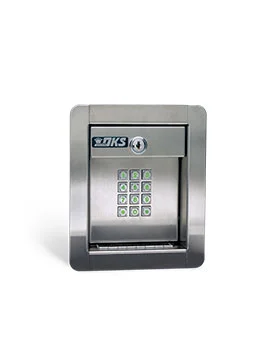
Model 1506
Flush Mount
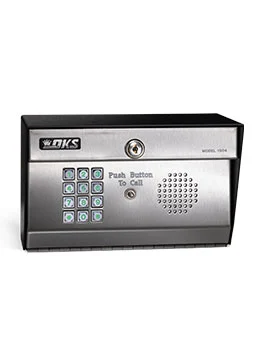
Model 1504-086
Surface Mount with Built-in Intercom
Also Available as Flush Mount
Technical Specifications
Specifications
- Stores up to 1000 4-digit entry codes.
- Six 5-digit entry codes.
- Two Form C dry contact relays.
- Time zone inputs.
- Secondary keypad capability.
- Operates on 16 volt AC power.
- Surface Mount Stainless Steel Faceplate – P/N 1506-086
- Flush Mount Stainless Steel Faceplate – P/N 1506-096
- Surface Mount with Intercom Substation – P/N 1504-086
- Flush Mount with Intercom Substation – P/N 1504-096
Features
- Rugged steel cabinet with stainless steel faceplates and metal Keypads.
- PIN (Personal Identification Number) codes are programmable from the Keypad.
- EEPROM memory will not lose programmed codes during power outages.
- Secondary Keypad capability for controlled entry/exit applications (1506 only).
- Ideal for controlling doors or gates. “Hold” codes to latch open a door or gate.
- Stores up to 1,000 4-digit entry codes, 6 5-digit entry codes.
Tech Support
Find all the documentation needed to install, program, and operate your DKS product below.

Quick Start Guides

Owner’s Manuals

Accessory Manuals

Easy Connect Manuals

Tech Tip Videos
Resources